

Transport management software in Lucknow for fleet owners and transporters
Omvian Logistics runs a transport business from booking to payment: quotations, trip planning and dispatch, fleet and drivers, tracking, proof of delivery, invoicing and the profit on every trip. The demo is the working product on a sample company.
- A truck cannot be put on two trips at once or loaded past capacity
- Every trip shows revenue, costs and contribution
- POD makes the shipment invoiceable the same minute
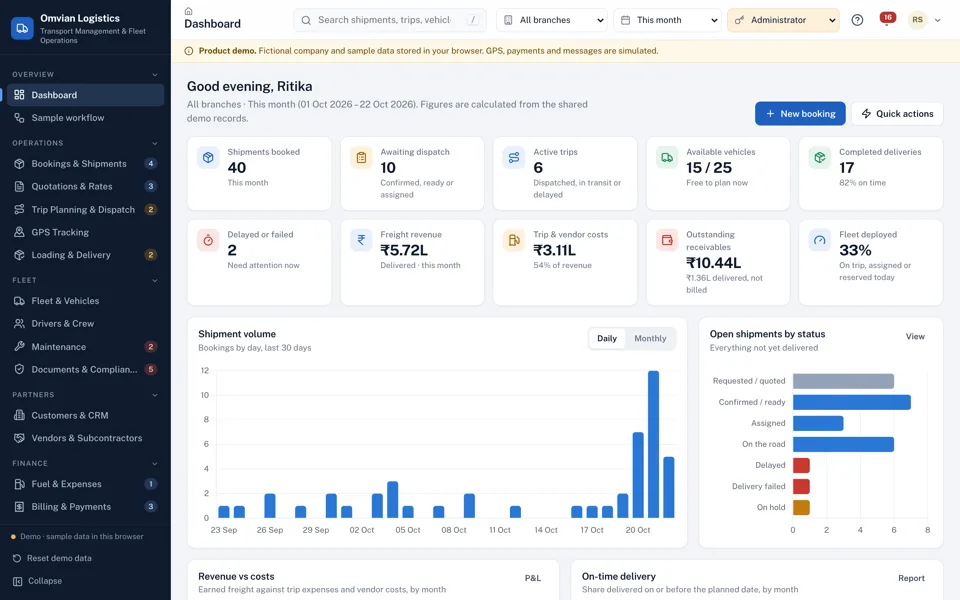
Inside Omvian Logistics
Screens from the working product on sample data. Book a demo and we will walk you through each one.
The dashboard opens on today’s operations and this month’s money. 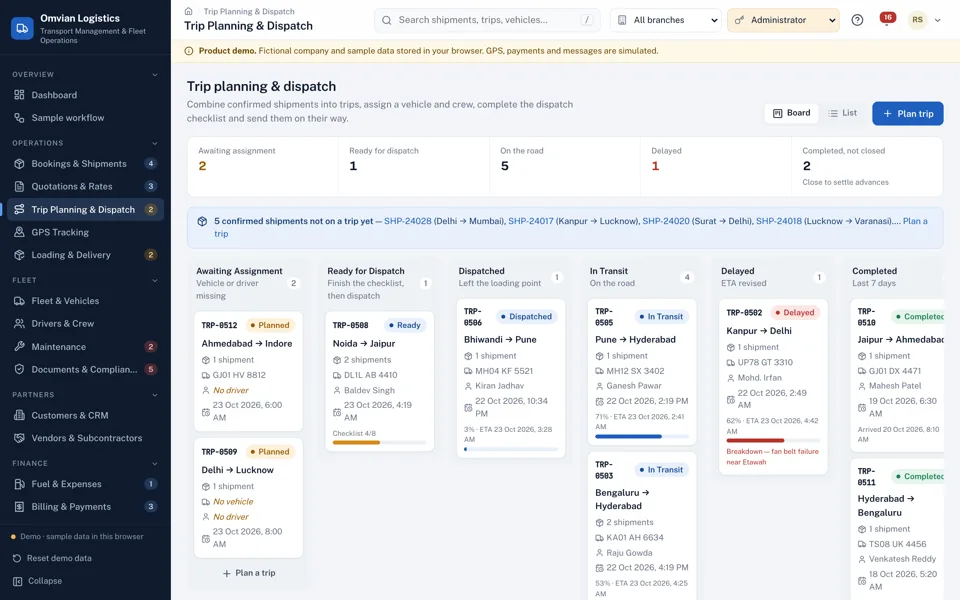
Every trip on one board, from awaiting a truck to delivered. 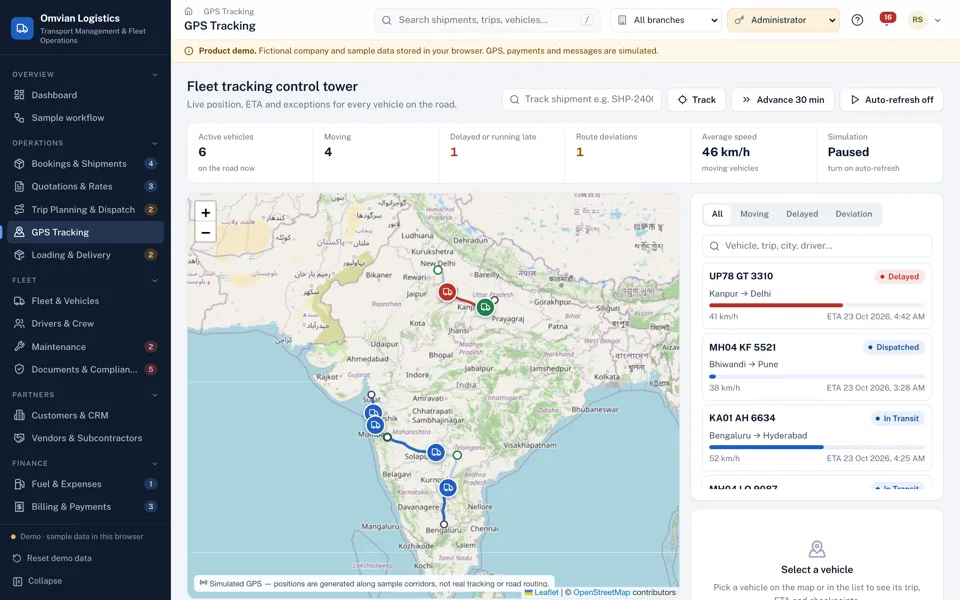
Simulated GPS in the demo; your tracker feed in production.
One record from the booking to the bank
A transporter in Lucknow with twenty-odd trucks usually runs on a register at the booking desk, a WhatsApp group for the drivers, a sheet of who is where, and a box of fuel slips that someone totals at the end of the month. The work gets done, but the questions that matter are hard to answer: which truck is free for tomorrow’s Delhi load, whether the fitness certificate on the trailer has lapsed, which deliveries have a signed POD, which have been billed, and whether the Kanpur lane actually makes money once fuel, tolls and the driver’s bhatta are paid.
Omvian Logistics keeps all of it on one set of records. A booking or an accepted quotation becomes a shipment without re-typing the route, cargo or charges. Shipments are combined onto a trip, and the availability checker refuses a vehicle that is already on another trip, in the workshop, out of service, carrying an expired document or too small for the load, and a driver whose licence has expired or who is on leave.
Dispatch runs through an eight-point checklist, the trip moves across a dispatch board, and the driver works from a phone screen: acknowledge the trip, record checkpoints, report a delay or breakdown, submit fuel and toll expenses, and capture the receiver’s signature at delivery. The POD completes the shipment, the trip closes itself when every drop is done, and the shipment appears in the unbilled list for accounts.
From there it is invoices with GST, part payments, credit notes, customer ageing, vendor bills matched against work orders, driver advance settlements and sixteen reports, down to contribution per trip and per lane. The demo runs on a fictional company with six months of history. A deployment runs on a server with your vehicles, rates, staff logins and the GPS, e-way bill and payment connections you choose.
Who it is for
- Transporters and fleet owners running 10 to 200 trucks
- Logistics companies mixing own vehicles with market or attached trucks
- Manufacturers and distributors running their own dispatch
- Brokers who outsource loads to vendors and need the margin on each
- Operators with branches in more than one city
What Omvian Logistics does
Bookings, quotations and freight rates
Quote per kilometre, trip, tonne, vehicle, pallet, cubic metre or a fixed contract rate, with fuel surcharge, tolls, loading, detention, extra stops, insurance and discount. Totals update as you type, and an accepted quotation converts into a shipment with everything carried over.
Trip planning with availability checks
Combine shipments from one pickup city onto a trip. The vehicle and driver checker blocks double bookings, overloads, expired insurance, fitness or permits, expired licences and drivers on leave, and warns about anything expiring soon.
Dispatch board and checklist
Trips move from awaiting assignment to ready, dispatched, in transit, delayed and completed. Dispatch needs the full checklist: inspection, documents, cargo, fuel and advance, customer notification and the dispatcher’s authorisation.
Vehicle tracking and trip timeline
A control tower map with every truck on the road, ETA, distance left, speed, delays, route deviations and geofence events, plus a tracking page you can share with customers. Positions in the demo are simulated; your tracker feed is connected at setup.
Driver app with POD and signature
Drivers acknowledge trips, record checkpoints, report delays and breakdowns, submit expenses and capture the receiver’s signature with shortage, damage and rejected quantities. Partial deliveries are recorded as such.
Trip expenses, fuel and driver advances
Fuel with litres, price and odometer, FASTag tolls, bhatta, loading and repairs, each with a receipt reference. Category limits, duplicate warnings and approvals, fuel efficiency in km per litre, and advance settlement when the trip closes.
GST invoicing and receivables
Invoice delivered shipments one at a time or consolidated, record part payments and credit notes, and see ageing by customer. Shipments close when their invoice is paid. Tax rules are settings your CA confirms.
Vendors and outsourced loads
Compare vendor rates on a lane, issue a work order, track the vendor’s truck, record the POD and match the vendor bill to the agreed cost. Differences are approved or disputed, and the margin between customer freight and vendor cost is shown on every load.
Fleet, maintenance and compliance
Vehicle master with insurance, RC, permit, fitness and PUC expiry, service schedules by date or odometer, workshop jobs with parts and labour, downtime, and a compliance register with renewal history for vehicles, drivers and vendors.
Sixteen reports, from the shipment and trip registers to driver performance, fuel consumption, route profitability and a P&L summary, each with filters, totals, CSV export and print. Trip contribution is reported separately from net profit, so overheads are never hidden inside a lane’s margin.
What changes in your business
- No truck promised to two loads, and no load bigger than the truck
- Expired insurance, fitness or licences caught before dispatch, not at a checkpost
- Every delivery backed by a signed POD and billed the same day
- Contribution per trip and per lane from real fuel, toll and driver costs
- Vendor bills checked against the agreed rate before they are paid
- Receivables and ageing by customer without a spreadsheet
Built in and connected
- GPS tracker or telematics feed (AIS-140 devices)
- E-way bill through the portal or a GSP
- UPI and bank payment links (Razorpay, Cashfree)
- WhatsApp Business and SMS alerts
- FASTag and fuel card statement import
- Tally or accounting export
- Cloud hosting with daily backups
Payment, messaging and hardware integrations are connected during setup, to the providers you already use where possible.
How we set up Omvian Logistics for you
- 01
Demo walk-through and quote
We go through the demo with your booking, dispatch and accounts staff and note what differs: lanes, rate types, trip sheet format, advance rules, branch structure and how you work with market vehicles. The quote follows from that.
- 02
Masters and documents
Vehicles with their documents and expiry dates, drivers and licences, customers with credit terms and rate cards, vendors with lane rates, branches and users loaded from your sheets.
- 03
Connections
Your GPS tracker feed, e-way bill access, payment links, WhatsApp or SMS alerts and the accounting export, as agreed in the quote.
- 04
Training and parallel run
Booking desk, dispatchers, drivers and accounts trained on their screens, then two to four weeks alongside your current register before switching over.
What we need from you
- Vehicle list with registration, type, capacity and document expiry dates
- Drivers with licence numbers, classes and expiry dates
- Customers with GSTIN, credit limits and agreed lane rates
- Vendors or market transporters you use, with their usual rates
- Your LR, trip sheet and invoice formats
- GPS provider details, if your trucks already carry trackers
None of it has to be tidy. Discovering that your data is messier than expected is part of the job, not a reason to delay starting.
Omvian Logistics — questions buyers ask
Including what it costs, what it does not do, and who should buy something else.
Is this for transporters with their own trucks, or for brokers?
Both. Own vehicles go through trip planning, dispatch and trip costing. Loads you hand to another transporter go through work orders, where the vendor’s truck, POD and bill are tracked against the rate you agreed, and the margin on the load is shown. Most fleets do both in the same week.
Does it include GPS tracking?
The tracking screens, ETA, delay and route-deviation alerts and the customer tracking page are part of the product. The positions in the demo are simulated. In a deployment we connect the feed from your trackers or telematics provider; if your trucks have none yet, we can advise on AIS-140 devices.
How is GST handled on freight?
Each shipment carries a tax rule from settings, such as GTA at 12% under forward charge or 5% under reverse charge, and invoices split CGST and SGST or show IGST by state. The rules in the demo are samples. Your CA should confirm the rate and mechanism for your services before go-live.
Can drivers use it on their phones?
Yes. The driver screen is built for a phone in a cabin: large buttons to acknowledge a trip, record checkpoints, report a breakdown, add an expense with its receipt, and take the receiver’s signature. Nothing to install; it opens in the phone’s browser.
Does it generate e-way bills and LRs?
It produces the consignment note (LR), trip sheet, POD, work order and invoice. E-way bills are generated on the government portal; the system stores the e-way bill number against the shipment, and generation can be connected through the portal or a GSP during setup.
How do you work out profit per trip?
Trip revenue is the freight of the shipments on it, before tax. Trip cost is fuel, tolls, driver allowance and other trip expenses, or the vendor cost on outsourced loads. When several customers share a truck, costs are split by revenue so nothing is counted twice. That is trip contribution; the P&L report then takes off maintenance and overheads to reach net profit.
What does it cost?
It depends on fleet size, number of branches, which connections you need (GPS, e-way bill, payments, WhatsApp) and how far your process differs from the demo. We quote after a short call about how you book and dispatch today, not from a price list.
Is support local?
We are a Lucknow company, so for transporters in Lucknow, Kanpur and nearby we set it up on site and train the desk and drivers in person. Operators elsewhere in Uttar Pradesh and across India get remote setup and support by phone and screen-share.
Other products
When you need it built differently
The product is a starting point. These are the services behind it, for when the requirement goes further.
See a load go from quotation to payment
Book a demo and we will run the sample workflow with you: plan a trip on the dispatch board, deliver it from the driver app and raise the invoice. If it fits how you work, send us your vehicle list and a few sample trips and we will plan the setup with you.