Restaurant POS software that runs the floor, the kitchen and the stock room
DineFlow is restaurant POS and management software for dine-in, takeaway and delivery: billing with KOT and split bills, a kitchen display, QR table ordering, a live floor plan, and stock that falls by recipe with every sale, across one outlet or several.
- POS billing, KOT, hold and split bills
- Kitchen display with timers and stations
- Recipe costing that moves stock on every sale
Inside DineFlow
Screens from the working product on sample data. Book a demo and we will walk you through each one.
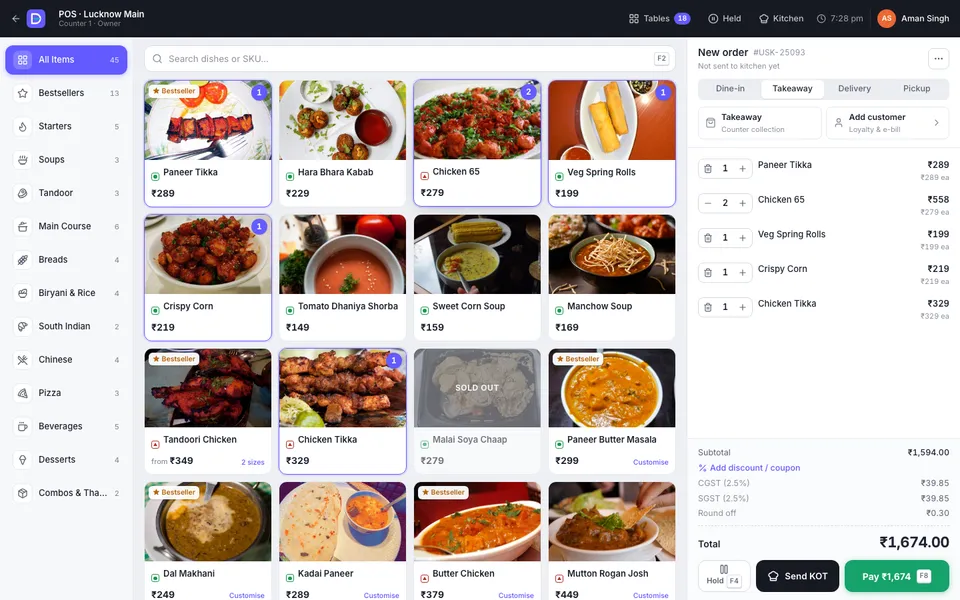
The POS: a takeaway order built from the photo menu, with the GST breakup before payment. 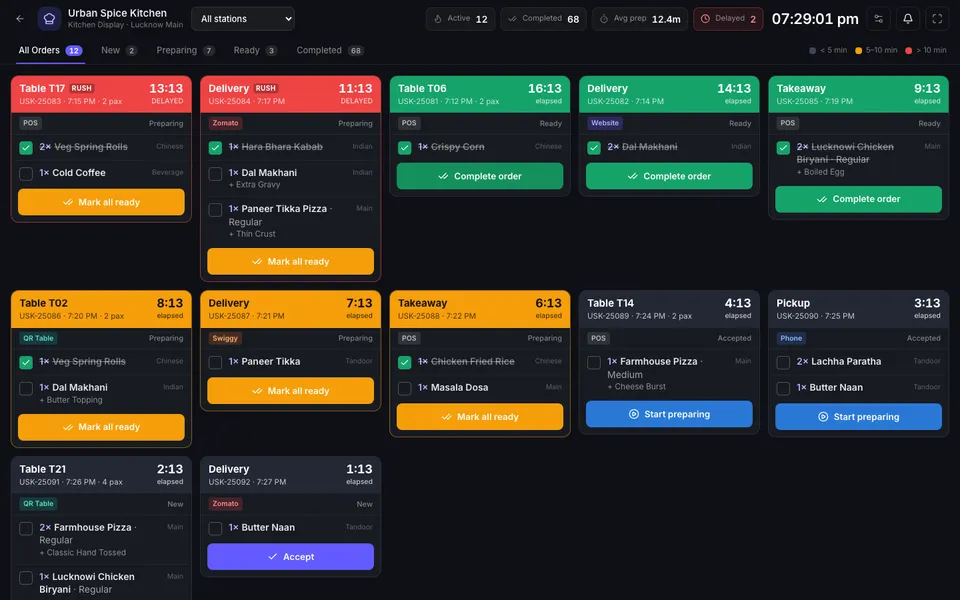
The kitchen display: tickets from every channel with timers, RUSH flags and per-item ready ticks. 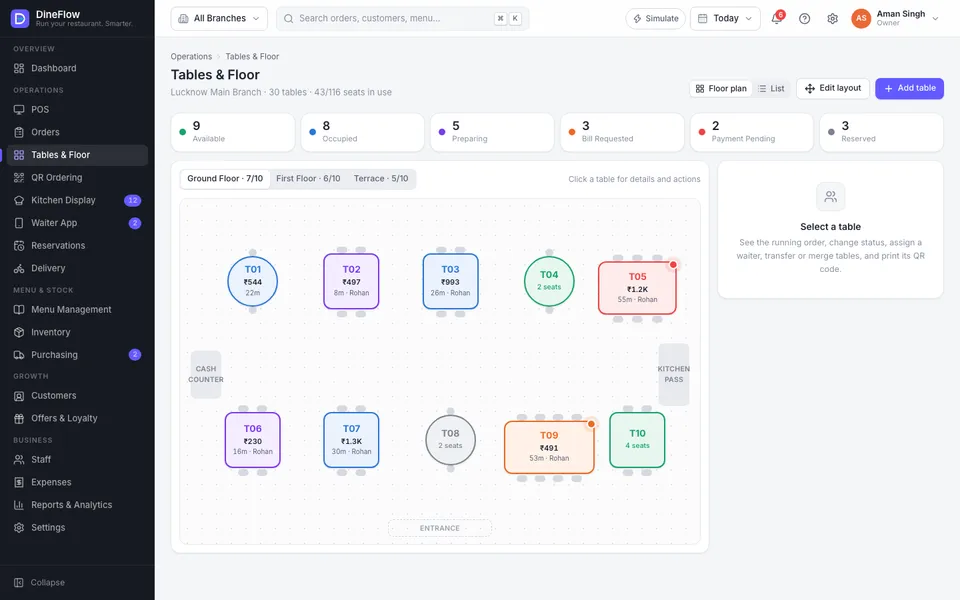
The floor plan: every table's status, running bill and waiter at a glance. 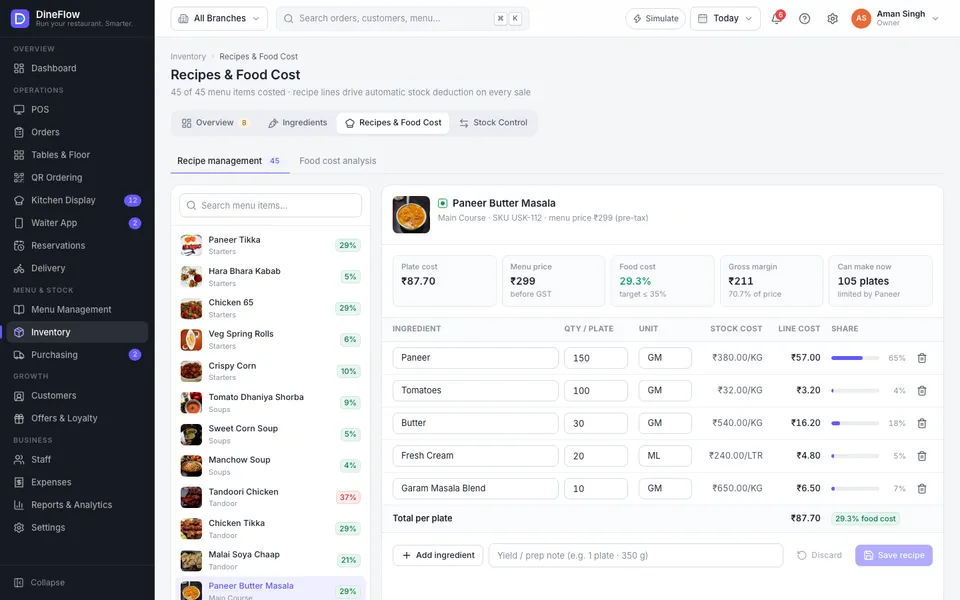
Recipes and food cost: plate cost, margin and how many plates the stock can make. 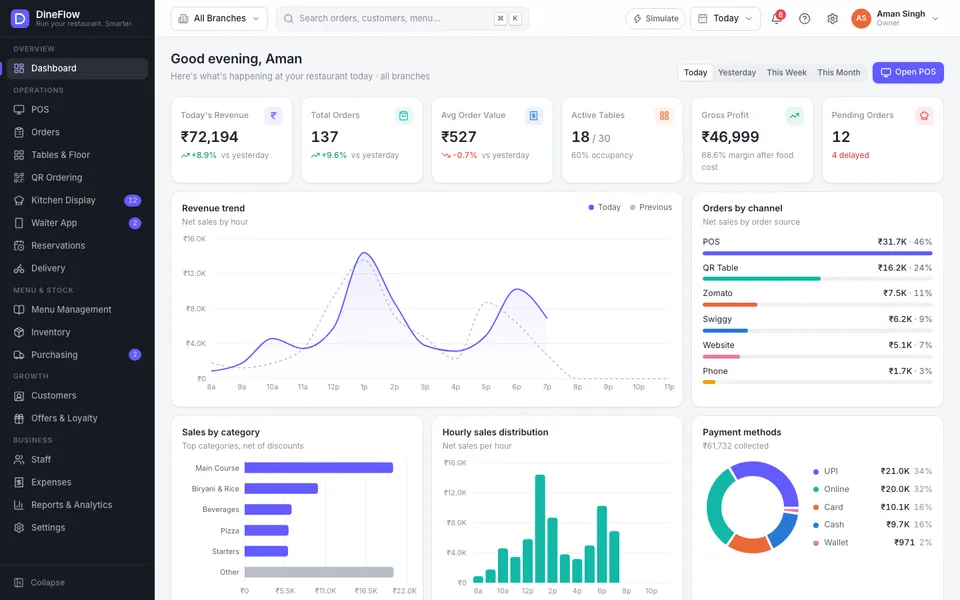
The owner's dashboard: revenue, orders, food-cost margin and channels across every outlet.
Restaurant billing software that follows the order from table to kitchen to stock
Restaurant POS software gets judged at nine on a Saturday night: every table full, three delivery apps pinging, a party of six asking to split the bill four ways, and the kitchen shouting for a ticket that never printed. If billing, the kitchen and the stock room each keep their own records, the owner finds out what went wrong the next morning, from the cash drawer.
DineFlow keeps one order from start to finish. The captain or the guest places it, from the POS, the waiter app or a QR code on the table. It reaches the kitchen display as a ticket with its station, notes and a timer. When it is billed, every ingredient in the recipe comes off stock. The dashboard and reports are worked out from those orders, so sales, food cost and GST tie back to real bills.
The demo is Urban Spice Kitchen, a fictional restaurant in Lucknow with three outlets, 30 tables, 45 dishes, 36 ingredients and a week of itemised orders. Sign in as the owner, manager, cashier, head chef or waiter and you see the product from that role. Open the guest menu, the POS and the kitchen in three tabs and an order placed on the phone shows up in the kitchen within moments.
DineFlow suits restaurants, cafés, QSRs, cloud kitchens and family dining chains that bill dozens to hundreds of orders a day. If guests eat in their cars and order from the parking lot, OrderMe is built for that. If you run a supermarket or kirana counter rather than a kitchen, look at Billora.
Who it is for
- Family and fine-dining restaurants with table service
- Cafés, bakeries and quick-service counters
- Cloud kitchens taking most orders through delivery apps
- Restaurant groups with two or more outlets and one owner
- Hotel restaurants and banquet kitchens
- Owners who want food cost and wastage checked daily, not at month-end
What DineFlow does
POS billing built for a rush
Dine-in, takeaway, delivery and pickup from one screen. Variants, required add-ons and cooking notes, keyboard shortcuts for search (F2), hold (F4) and payment (F8), coupons and discounts, and a bill that can be split, merged or moved to another table.
KOT and kitchen display
Orders reach the kitchen as tickets grouped by station, with colour-coded timers, RUSH flags and cooking notes. Chefs mark items ready one by one, recall a ticket, and see average prep time. A paper KOT printer can run alongside or instead.
QR table ordering
Each table gets its own QR code. Guests browse a mobile menu in English or Hindi, filter veg dishes, customise, order, track the kitchen live and call for water, the waiter or the bill. Orders land on the POS and the kitchen display without anyone re-typing them.
Live floor plan and waiter app
Every floor laid out as it really is, with tables coloured by status: free, occupied, preparing, bill requested, payment pending or reserved. Transfer, merge and split tables, assign waiters, and give captains a phone app for their section and guest requests.
Payments, split bills and receipts
Cash, UPI with a QR for the exact amount, card, wallet or a mix of them, with a bill split equally or by item. An 80 mm receipt carries GSTIN, FSSAI number and the tax breakup, and can be reprinted from the order history.
Recipes and food cost
Each dish has a recipe in grams and millilitres. DineFlow works out the plate cost, food-cost percentage and margin, flags dishes above your target, and tells you how many plates current stock can make.
Stock that moves with every sale
Billing a dish deducts its ingredients. Wastage, staff meals and transfers between outlets are recorded with a reason, low stock and expiry are flagged, and a stock audit compares what the system expects with what is on the shelf.
Purchasing and suppliers
A low-stock item becomes a purchase request, then an approved purchase order, then a goods receipt that raises stock. Supplier invoices and payments go to each supplier's ledger, so dues are always known.
Delivery apps, reservations and customers
Zomato, Swiggy, website and phone orders sit on one delivery board with riders and zones. Reservations, a walk-in queue, customer profiles, loyalty tiers, wallet balances, offers and happy hours are managed in the same system.
Reports for the owner and the CA
24 reports, including sales summary, GST summary, food cost, item and category sales, staff performance, expenses and profit and loss, with every report filtered by outlet and date and exported to CSV.
The demo runs on sample data in your browser, so we can take orders, bill, refund and close the day in front of you without touching anything. Sign-in, payments, printers, delivery apps and messages are simulated in the demo. A deployed DineFlow runs on a server or in the cloud, with staff logins, roles, backups and the integrations you choose.
What changes in your business
- No order lost between the table, the kitchen and the bill
- Kitchen delays visible while there is still time to fix them
- Food cost known per dish, not guessed at month-end
- Stock that matches the shelf, with wastage recorded
- Every discount, cancellation and refund traceable to a person
- Delivery-app, QR and counter orders in one place
- Each outlet's sales, costs and GST in one report for your CA
Built in and connected
- 80 mm thermal printers
- KOT printers
- Kitchen display screens
- Android tablets and phones
- UPI dynamic QR
- Card terminals (EDC)
- Zomato and Swiggy
- WhatsApp Business API
- Tally export
- React
- Node.js
- PostgreSQL
Payment, messaging and hardware integrations are connected during setup, to the providers you already use where possible.
How we set up DineFlow for you
- 01
Restaurant walk-through
We watch a busy service, then map your floors, tables, kitchen stations, printers, screens and the delivery apps you use. Hardware that works is kept; anything missing is specified before you buy.
- 02
Menu, recipes and tax setup
Your menu comes in with variants, add-ons and prices, and the dishes that matter most get recipes. We set the GST rate for each outlet and send your CA a short list of anything to confirm.
- 03
Trial service, then switch-over
DineFlow runs beside your current system for a few quiet services, so bills, KOTs and stock are proven on real orders. Cashiers, captains and the kitchen are trained in a slow slot before the full switch.
- 04
Support after go-live
Fixes, menu and rate changes, new reports and hardware help under a support agreement. In Lucknow we come to the restaurant; elsewhere support is remote, with visits when a counter or kitchen needs one.
What we need from you
- Menu with categories, variants, add-ons and prices, from Excel, a PDF or your current software
- Floor layout: floors, table numbers and seats
- Kitchen stations and which printers or screens each one uses
- GSTIN, FSSAI licence number and your receipt format
- Ingredient list and recipes for your top dishes, or time with your head chef to write them
- Delivery apps, payment providers and staff roles you want set up
None of it has to be tidy. Discovering that your data is messier than expected is part of the job, not a reason to delay starting.
DineFlow — questions buyers ask
Including what it costs, what it does not do, and who should buy something else.
Will billing stop if the internet goes down?
The browser demo can't show this, as it has no server to lose. For a live restaurant, offline billing is a setup option we recommend wherever service cannot stop: the POS and KOT keep working on the local network and sync with the cloud when the connection returns. We scope it to your outlets and network.
Does it print KOTs, or do we need a kitchen screen?
Either, or both. Each kitchen station can print its own KOT on a thermal printer, show tickets on a kitchen display screen, or do both during a changeover. Many kitchens start with printers and move the busiest station to a screen once the team trusts it.
Can it take Zomato and Swiggy orders?
In the demo, delivery-app orders are simulated. Live, they can reach DineFlow through the aggregators' POS integration or an integration partner, depending on what your partner accounts allow, so they appear on the delivery board and the kitchen display without re-typing. We confirm the route for your account during scoping.
How is GST worked out on restaurant bills?
Most standalone restaurants charge 5% GST without input tax credit, split as 2.5% CGST and 2.5% SGST, which is what the demo shows. Restaurants inside hotels with room tariffs above ₹7,500 a night charge 18%. DineFlow sets the rate per outlet and reports GST by outlet and rate. Your CA confirms the setup before go-live; the demo values are illustrative.
Can we run several outlets and a central kitchen?
Yes. The demo has three outlets with their own tables, kitchens and stock, and the owner can look at one outlet or all of them together. Menus and prices can be shared or set per outlet, and stock can be transferred between outlets or from a central kitchen with a record of every movement.
Can guests order from their phones without installing an app?
Yes. Each table's QR code opens the menu in the phone's browser, in English or Hindi. The guest orders, follows the kitchen's progress and can call for water, the waiter or the bill. In the demo the table comes from the link; a live system uses a signed table code so a guest can't order for another table.
What does it cost?
It depends on how many outlets, counters and kitchen stations you run, the hardware you already have, and extras such as delivery-app integration, a central kitchen, Tally export or WhatsApp bills. Hardware is separate if you need it. We quote after a short call or a visit, once we have seen how your restaurant works.
Can you customise it, and who supports it after go-live?
Yes. Your restaurant's name, logo, menu photos and receipt layout replace DineFlow's, and we add what your service needs, such as banquet orders or a bar menu. Our office is in Lucknow, so restaurants here get installation, training and support visits in person. Restaurants elsewhere in India get remote setup, then phone and remote support.
Other products
When you need it built differently
The product is a starting point. These are the services behind it, for when the requirement goes further.
See DineFlow with your own menu
Tell us how many outlets and tables you run and which delivery apps you use. We will take you through the demo on a call or at your restaurant, show how your menu and kitchen would work in it, and quote for the setup.