

Car rental software for self-drive fleets, with a booking website and operations console
DrivezyGo is a booking website for your customers and a console for your team: fleet, licence checks, handovers, return inspections and deposit refunds on one set of bookings. The demo is the working product on sample data.
- A car cannot be booked twice for overlapping dates
- Hourly, daily, weekend and long-trip pricing
- Return inspection works out the deposit refund
Inside DrivezyGo
Screens from the working product on sample data. Book a demo and we will walk you through each one.
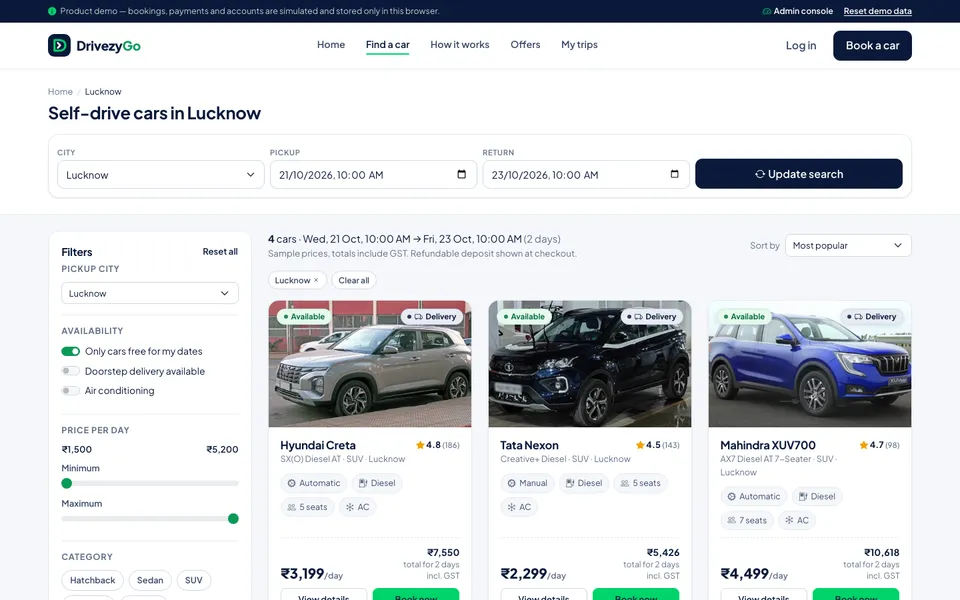
Customers see only cars that are free for their dates, with the trip total. 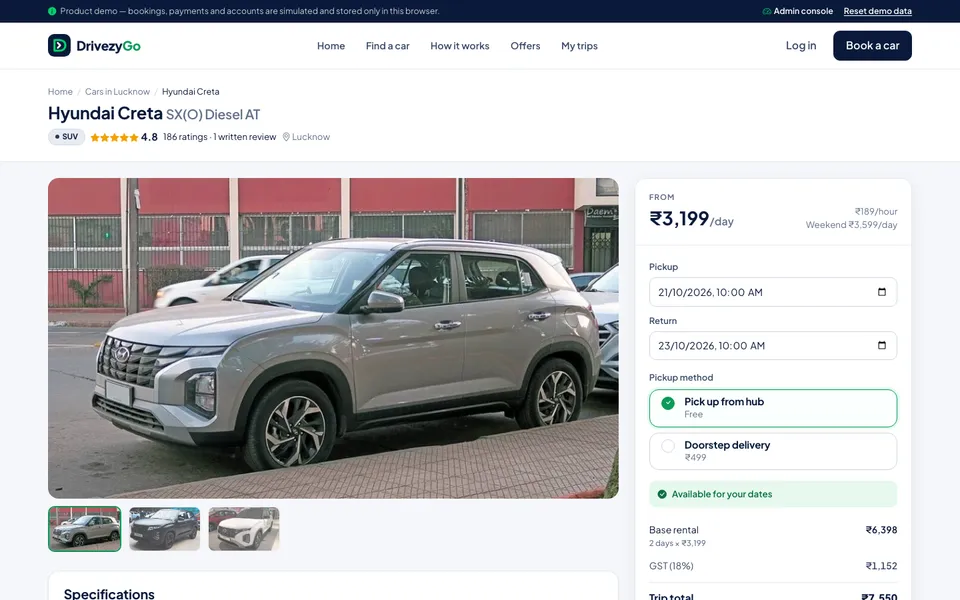
The price on the car page is the price at checkout. 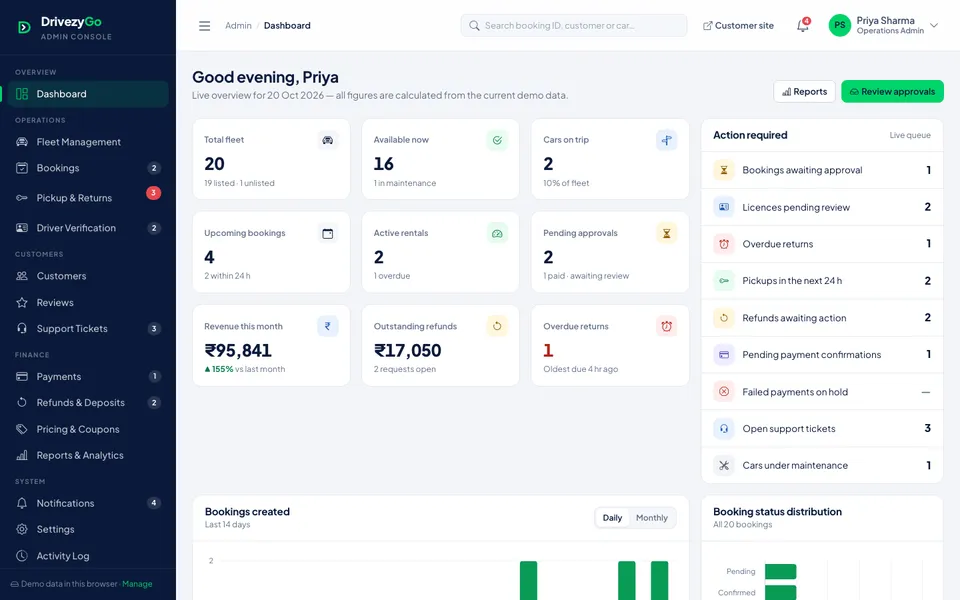
The console opens on what needs doing today.
One fleet, one calendar, one settlement
A self-drive rental business in Lucknow with fifteen or twenty cars usually runs on WhatsApp enquiries, a shared sheet of who has which car, and a notebook at the parking lot. The trouble shows up at the edges: two customers promised the same Creta for the same weekend, a licence nobody checked, an odometer reading that was never written down, and a deposit argument at return because the fuel and the scratch were not recorded at pickup.
DrivezyGo puts the booking and the handover on the same record. Customers search by city and dates, filter by category, transmission, fuel and seats, and see only cars that are free for their trip. The price breakdown on the car page is the price at checkout: full days at the daily rate, the remaining hours at the hourly rate, weekend and peak-date rates, long-trip discounts, delivery, extras and protection, with the refundable deposit shown separately.
Behind the website is the console your team works in. A booking is approved only when payment has gone through, the driving licence is verified and the car is still free. Pickup records the ID check, odometer, fuel and condition. Return records the same again and works out late fees, extra kilometres, fuel shortfall and damage, then the deposit refund that follows from them.
The demo runs on sample data: a fictional fleet across six cities with customers, bookings, payments, refunds and reviews already in place, so a demo can book a car as a customer, then approve, hand over and settle it as the operator. A deployment runs on a server with real staff logins, your payment gateway and backups, set up with your fleet, rates, policies and branding.
Who it is for
- Self-drive car rental agencies with a fleet of 5 to 100 cars
- Travel operators adding self-drive cars to chauffeur-driven trips
- Owners who take bookings on WhatsApp and want them on a website
- Rental desks at airports, railway stations and hotels
- Businesses running cars across more than one city
What DrivezyGo does
Car rental booking website with live availability
Search by city and dates, filter by category, transmission, fuel, seats, price and rating, and show only cars free for the trip. A car that is booked, on a trip or under maintenance never appears as available.
Hourly, daily and weekend pricing
Daily and hourly rates per car, weekend rates, peak-date surcharges and discounts for 3+ and 7+ day trips. One pricing engine serves the listing, checkout, receipt and console, and each booking keeps a snapshot of its price.
Checkout with extras, coupons and deposit
An 8-step checkout covers trip, driver, pickup or doorstep delivery, extras such as child seats, protection plans, coupons and payment. The draft survives a refresh, and a checkout token stops a double tap from creating two bookings.
Driving licence verification before approval
Each customer carries a licence status. A booking cannot be approved, and a rental cannot start, until the licence is verified, so the check happens before the keys change hands rather than after.
Pickup handover checklist
ID check, vehicle condition, odometer, fuel level, damage notes and a photo, recorded at handover. The rental moves to active only when the checklist is complete and the handover is confirmed.
Return inspection and deposit settlement
Enter the return time and odometer and the settlement updates as you go: late fee, extra kilometres, fuel shortfall and damage, with damage capped by the protection plan the customer chose. What is left of the deposit becomes a refund to approve.
Fleet management and maintenance
Add cars with photos, specifications, rates and pickup location. Put a car into maintenance and it leaves customer search at once; a car on a trip or with upcoming bookings cannot be removed by mistake.
Payments, refunds and coupons
Successful, failed and pending payments, with holds that release the car when a payment does not complete. Refunds go through approve then process, and can never exceed what was paid. Coupons carry dates, limits and minimum orders.
Car rental reports and dashboard
Fleet, availability, active and overdue rentals, revenue and an action queue on the dashboard. Ten reports, including car-wise earnings, fleet utilisation, cancellations and deposit settlement, export to CSV.
GPS tracking and telematics are not part of the demo. If your cars carry a tracker, we connect its feed during setup. Licence checks in the demo are a review step by your team; an automated check can be connected where a provider is available to you.
What changes in your business
- No car promised to two customers for the same dates
- Bookings from your own website instead of WhatsApp threads and calls
- Licence checked and handover recorded before every trip
- Deposit refunds worked out from the return inspection, not argued at the counter
- Fleet utilisation and car-wise earnings without a spreadsheet
- One record of every booking, payment and refund for your accountant
Built in and connected
- UPI and card gateway (Razorpay, PayU or Cashfree)
- WhatsApp Business API reminders
- SMS and email confirmations
- GPS tracker feed, connected at setup
- Print or PDF receipts
- Cloud hosting with daily backups
Payment, messaging and hardware integrations are connected during setup, to the providers you already use where possible.
How we set up DrivezyGo for you
- 01
Demo walk-through and quote
We go through the demo with you and note what differs in your business: cities and pickup points, rate rules, deposit and damage policy, delivery, and who approves bookings. The quote follows from that.
- 02
Fleet, rates and branding
Cars, photos, rates, weekend and peak rules, extras, protection plans, tax settings and policies configured. The website carries your name, colours and domain.
- 03
Payments and connections
Your payment gateway for rentals, deposits and refunds, plus WhatsApp, SMS and email confirmations, and a GPS feed if your cars have trackers.
- 04
Import, training and go-live
Upcoming bookings and customers imported, the desk trained on approvals, handovers and returns, and a short period run alongside your current sheet before switching over.
What we need from you
- Your fleet list: models, registration numbers, cities and pickup points
- Hourly, daily and weekend rates, deposits and delivery charges
- Your rental policy: fuel, kilometres, late returns, damage and cancellation
- Upcoming bookings and customer list, as Excel or a sheet export
- Car photos, your logo and domain
- A payment gateway account, or the documents to open one
None of it has to be tidy. Discovering that your data is messier than expected is part of the job, not a reason to delay starting.
DrivezyGo — questions buyers ask
Including what it costs, what it does not do, and who should buy something else.
Is this for self-drive rentals or cabs with a driver?
Self-drive. The booking, licence check, handover and return inspection are built around a customer driving the car themselves. If you also run chauffeur-driven trips, those can be added as a separate booking type during setup, and they are scoped and quoted on their own.
How does it stop double bookings?
A car is blocked for any pending, confirmed, upcoming or active booking that overlaps the requested dates, and an overdue rental keeps blocking until the car comes back. Availability is checked in search, on the car page, again at payment and once more when your team approves the booking.
How is GST worked out?
The tax rate is a setting, applied to the trip total after any coupon, with the refundable deposit kept outside it. The demo uses 18%. The rate that applies to renting out a vehicle without a driver depends on the vehicle, so your CA should confirm it before go-live.
How are security deposits and damage handled?
The deposit is collected with the booking and shown separately from the rental. At return, late fees, extra kilometres, fuel shortfall and damage are deducted, with damage capped by the protection plan the customer bought. The balance becomes a refund that your team approves and then marks as processed.
What does it cost?
It depends on the size of the fleet and number of cities, which connections you want (payment gateway, WhatsApp, GPS), how much your rules differ from the demo, and whether we host it. We quote after a short call about how you take bookings today, not from a price list.
Can customers and staff use it on a phone?
Yes. The booking website adapts to phones, which is where most rental searches start. The console runs in a browser on a desktop, tablet or phone, so the person at the parking lot can complete a handover or return inspection on the spot. Nobody installs an app.
Does it handle our permits and insurance?
No. Permits for running a self-drive rental business and insurance for the fleet stay with you and your advisers. The software records what happens on each trip: licence verification, handover, return, charges and refunds.
Is support local, or remote?
Both, depending on where you are. We are a Lucknow company, so we set it up with your team in person, train the desk on handovers and returns, and come back when something needs a look. Operators elsewhere in Uttar Pradesh and beyond get remote setup and support by phone and screen-share.
Other products
When you need it built differently
The product is a starting point. These are the services behind it, for when the requirement goes further.
See a rental from booking to deposit refund
Book a demo and we will book a car as a customer, then approve it, hand it over and complete the return with a damage charge in the admin console. If it fits your business, send us your fleet list and rates and we will plan the setup with you.